After getting the proprietary USB adaptor cable, I was able to test out the Direct Copy function.
The good news is that it works, the better news is that it works for both self-powered (using AC) HDD i.e. the 3.5" type and also USB powered HDD, i.e. the 2.5" variety. This is a big improvement over the Sanyo HD2000 where the similar function will only work with self-powered HDD and thus the much smaller USB powered HDD is ruled out. Another point to note is that the Sony camcorder must be on AC power, presumably this will avoid files lost in case it run out of power if on battery.
For my test, I used a Maxtor Basics, 640GB external HDD that is AC powered. This came preformatted in NTFS and the camcorder programme suggested to reformat the HDD to FAT32. It took about 40 seconds for the formatting.
It then asks if you want to Play or Play Without Copying.
If you access the Menu when an external HDD is connected, you'll find an item, Easy Copy under the Edit group. You will use to copy videos to the HDD. The camcorder will first calculate the necessary space for HD movie copy. In my case it took about 3 minutes since there were about 100GB of videos and then the copying starts. This took quite a while and luckily there was a progressive timeline on the camcorder that also shows the elapsed time. In my case it took about 2 hours and 15 minutes and this seems to be faster than a Windows copy that I did earlier which took about 3 hours. (Not sure of the actual timing since I just left it to run but definitely it took longer earlier.)
Three folders are created in the HDD; they are AVCHD, DCIM and PRIVATE. Photos are stored in a subfolder under DCIM and videos are stored in the subfolder STREAM under AVCHD as .mts files. This file structure is same as the one on the build-in HDD and thus you can play and manipulate them on the camcorder just like they are on the built-in HDD or SDHC card.
When the HDD is connected to a PC installed with PMB, the programme recognises it and offer to import the files over as if the camcorder is connected.
This Direct Copy function is not so useful for me since the XR350 already has a 160GB built-in HDD. For other models that uses only SDHC cards, it would be very useful when going on long holidays since you can copy your files to an external HDD without the need of a PC and freed the SDHC card for more videos. Thus you need not carry a lot of SDHC cards.
Ronald Kwok
Showing posts with label Direct Copy. Show all posts
Showing posts with label Direct Copy. Show all posts
Thursday, August 5, 2010

Saturday, July 3, 2010
Using Direct Copy
The Direct Copy is new in this year's Sony range of camcorder. What it does is that it will transfer the files (videos and photos) from the camcorder to an external hard disk drive (HDD) directly without using a PC. Actually the Sanyo Xacti camcorders (including the HD2000 and FH1) already had something similar last year so Sony is not the first. But Sony is the first among the big three as Canon and Panasonic have not introduced this feature so far in their range this year. For Panasonic, this is surprising since they have already acquired Sanyo and are already using the 60p resolution in their top range of 700 series camcorders. Actually in my case since I have the XR350 with a built-in 160GB HDD, the Direct Copy is not so useful. This is more for the CX 300 and CX350 with small capacity of internal memory.
Since I wanted to test the Direct Copy function in the Sony and the USB adaptor cable is not provided, I went to Low Yat Plaza and bought the generic cable (the USB AF to 5 pin, F is for Female) to do the connection. But alas, when I hooked up the XR350 to my external HDD, nothing happened. I then checked in the AFS Forum and found that you need to get the original VMC-UAM1 cable from Sony as they must have wired the port differently from the normal. I thought I have escaped from the proprietary memory stick of the Sony but now I still need to get another Sony proprietary item, what a shame.
Not accepting defeat, I thought I can out-smart Sony. Since the same 5-pin port is used for connecting the camcorder to a PC with the USB cable that came with the camcorder, I can use this cable and use a AF-AF converter to connect to the external HDD. Thus I went and bought this converter and did the connection. Again, nothing happened and it looks like I have no choice but to get the cable from Sony. Before doing that, has any owner of this Sony range found another solution to connect an external HDD, other than using the proprietary Sony cable? Please share in the comments and help all the poor souls out there and not make Sony rich.
Below are shots of the cables I tried so it will be clearer.

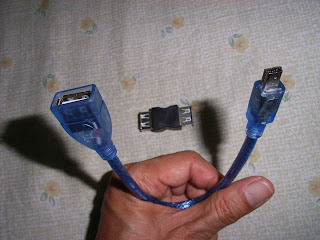
You may want to try your luck but I think Sony will win. Sigh.
Since I wanted to test the Direct Copy function in the Sony and the USB adaptor cable is not provided, I went to Low Yat Plaza and bought the generic cable (the USB AF to 5 pin, F is for Female) to do the connection. But alas, when I hooked up the XR350 to my external HDD, nothing happened. I then checked in the AFS Forum and found that you need to get the original VMC-UAM1 cable from Sony as they must have wired the port differently from the normal. I thought I have escaped from the proprietary memory stick of the Sony but now I still need to get another Sony proprietary item, what a shame.
Not accepting defeat, I thought I can out-smart Sony. Since the same 5-pin port is used for connecting the camcorder to a PC with the USB cable that came with the camcorder, I can use this cable and use a AF-AF converter to connect to the external HDD. Thus I went and bought this converter and did the connection. Again, nothing happened and it looks like I have no choice but to get the cable from Sony. Before doing that, has any owner of this Sony range found another solution to connect an external HDD, other than using the proprietary Sony cable? Please share in the comments and help all the poor souls out there and not make Sony rich.
Below are shots of the cables I tried so it will be clearer.


You may want to try your luck but I think Sony will win. Sigh.
From reading the manual and the AFS Forum, this Direct Copy is an improvement over the Sanyo. In the Sanyo, you must use a self-powered HDD meaning you must use the bigger 3.5" HDD while in the Sony you can also use the much smaller USB-powered 2.5" HDD. This is more convenient in terms of portability. I can only tell you more about the Direct Copy after getting the Sony cable. So hang on there.
Ronald Kwok
Ronald Kwok
Thursday, June 24, 2010
Something missing from Sony
OK, folks, I am now back from my holidays in Germany with my wife and the Sony XR350E camcorder. All of us survived the trip and the built-in 160GB HDD is just great for travelling. I shot almost 100GB of videos, mostly short clips and some of them trash, of course. But hey, when you do not have to worry about running out of storage space, you tend to be trigger happy.
I just managed to sort out my videos under the various places that I visited and only when I wanted to do some basic editing that I realised an important feature (to me at least) is missing from the Sony. I was so used to cutting and joining my video clips with the Sanyo HD2000, just using the camcorder itself without having to open an external editor and I expected to be able to do the same with the Sony. The Cut (or Divide function as the Sony calls it) is there but there is no Join function built into the camcorder. I could not find this Join function even in the included editing software, PMB (Picture Motion Browser) so I was rather disappointed. Another useful information shown for each clip in the Sanyo is the length of the clip and surprisingly this is not shown in the Sony and you need to do it in a roundabout way to get this information.
Another feature that is less user friendly than the Sanyo is extracting photos from videos. In the Sanyo, you pause the video and select the frame you want to capture as a photo and just press the photo button. In the Sony, this function is included under the Edit menu and is thus not so readily available. This function is also available in the PMB software though. BTW, while the video is paused, you can zoom in with the Sanyo to check on the details but not in the case of the Sony.
I will give more details on the differences between the two in my later posts but definitely the Sony is superior in the image stabilisation and the auto-focus. To my eyes, I find the colour in the Sanyo more vibrant and more saturated while the Sony is subdued but more natural which will please the purist but many may prefer larger-than-life colours, especially to show off your new HDTV. Anyway, colour preference is usually a personal matter so this depends on individual tastes and each camera make will have its own colour characteristics. However, there are no settings in the Sony to change the image properties and at this price, this is surprising. There is a normal and vivid colour mode in the Sanyo but I don't see much difference between the two. The wider angle of the Sony lens is also useful for taking in the landscapes and buildings without panning.
(Maybe I am still new with the Sony and do not know where to look for the above features but I checked through the menus and cannot find them anywhere so perhaps more experienced users of the Sony may want to comment here.)
I wanted to test the Direct Copy function of the Sony but the USB adaptor cable is not included so I need to get one elsewhere and I could not connect directly to my HDTV from the HDMI port of the Sony since it uses the mini HDMI cable (not included) and not the standard size cable. On the other hand , the Sanyo uses the standard HDMI cable and the USB adaptor for connecting to an external HDD is provided but is different from the one required by the Sony so I'll end up with more cables! Sigh.
This is just to whet your appetite and I will post some videos from both the Sony and the Sanyo later after doing some editing to show their differences and similarities.
Ronald Kwok
I just managed to sort out my videos under the various places that I visited and only when I wanted to do some basic editing that I realised an important feature (to me at least) is missing from the Sony. I was so used to cutting and joining my video clips with the Sanyo HD2000, just using the camcorder itself without having to open an external editor and I expected to be able to do the same with the Sony. The Cut (or Divide function as the Sony calls it) is there but there is no Join function built into the camcorder. I could not find this Join function even in the included editing software, PMB (Picture Motion Browser) so I was rather disappointed. Another useful information shown for each clip in the Sanyo is the length of the clip and surprisingly this is not shown in the Sony and you need to do it in a roundabout way to get this information.
Another feature that is less user friendly than the Sanyo is extracting photos from videos. In the Sanyo, you pause the video and select the frame you want to capture as a photo and just press the photo button. In the Sony, this function is included under the Edit menu and is thus not so readily available. This function is also available in the PMB software though. BTW, while the video is paused, you can zoom in with the Sanyo to check on the details but not in the case of the Sony.
I will give more details on the differences between the two in my later posts but definitely the Sony is superior in the image stabilisation and the auto-focus. To my eyes, I find the colour in the Sanyo more vibrant and more saturated while the Sony is subdued but more natural which will please the purist but many may prefer larger-than-life colours, especially to show off your new HDTV. Anyway, colour preference is usually a personal matter so this depends on individual tastes and each camera make will have its own colour characteristics. However, there are no settings in the Sony to change the image properties and at this price, this is surprising. There is a normal and vivid colour mode in the Sanyo but I don't see much difference between the two. The wider angle of the Sony lens is also useful for taking in the landscapes and buildings without panning.
(Maybe I am still new with the Sony and do not know where to look for the above features but I checked through the menus and cannot find them anywhere so perhaps more experienced users of the Sony may want to comment here.)
I wanted to test the Direct Copy function of the Sony but the USB adaptor cable is not included so I need to get one elsewhere and I could not connect directly to my HDTV from the HDMI port of the Sony since it uses the mini HDMI cable (not included) and not the standard size cable. On the other hand , the Sanyo uses the standard HDMI cable and the USB adaptor for connecting to an external HDD is provided but is different from the one required by the Sony so I'll end up with more cables! Sigh.
This is just to whet your appetite and I will post some videos from both the Sony and the Sanyo later after doing some editing to show their differences and similarities.
Ronald Kwok
Subscribe to:
Posts (Atom)

 Posts
Posts


